
Building an MCP App: An Interactive Kanban Board the LLM Can Drive
How I built an interactive Kanban board as an MCP App — a UI served by an MCP server and rendered inside the chat — then deployed it to Bedrock AgentCore behind a Gateway. The interesting parts weren't the happy path: a widget-per-tool-call render bug, latency-zero drag races, and a /tmp SQLite store that silently reset on every call.
The Problem: The Chat Can Talk, but It Can't Show
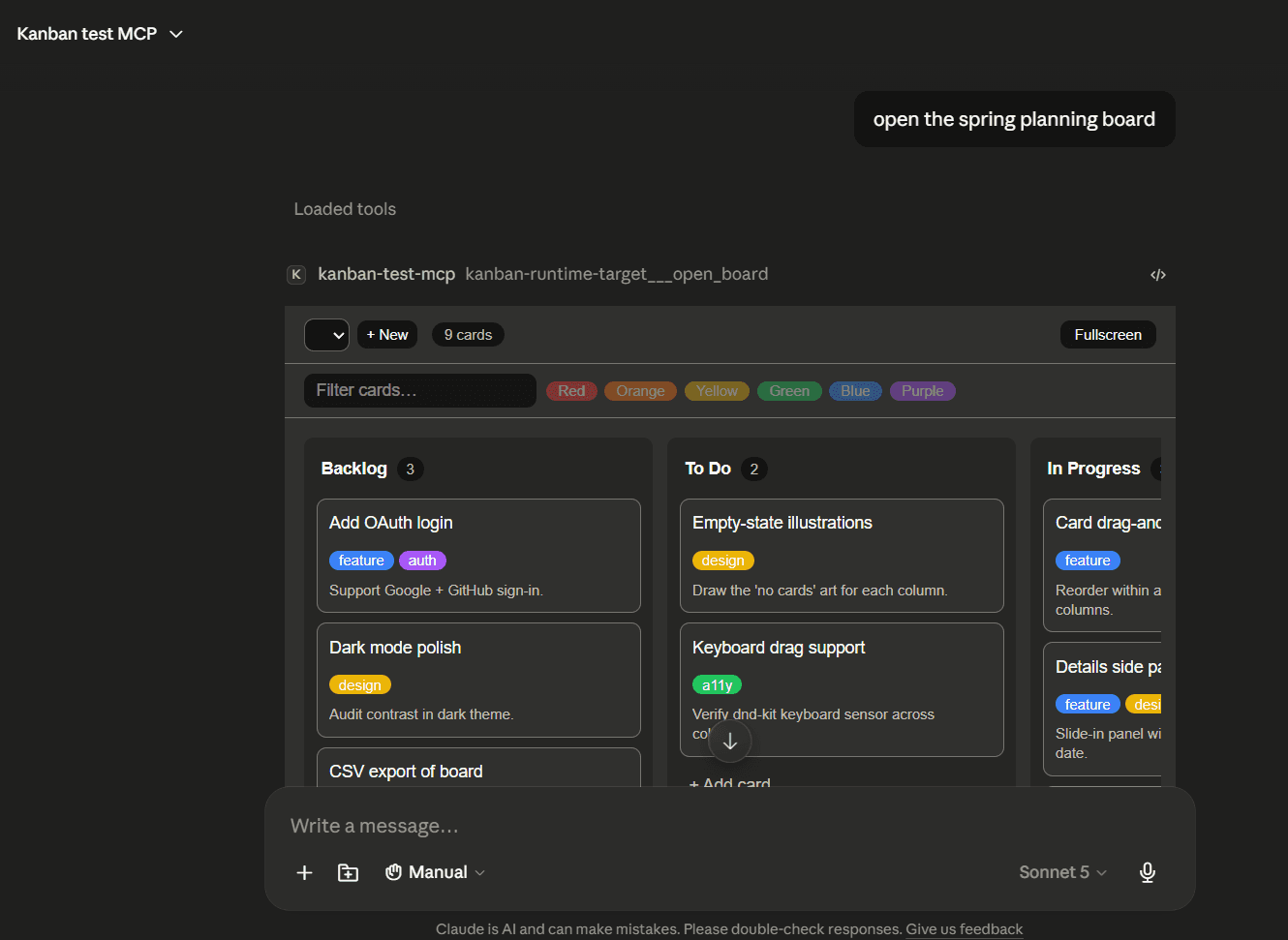
An MCP server gives an LLM tools — create_card, move_card, search_cards. That's enough for the model to do things on your behalf, but the user still only ever sees text. Ask an agent to organize your sprint and it types back a bulleted list of what it did. There's no board to look at, nothing to drag, no way for you to move a card the model got slightly wrong.
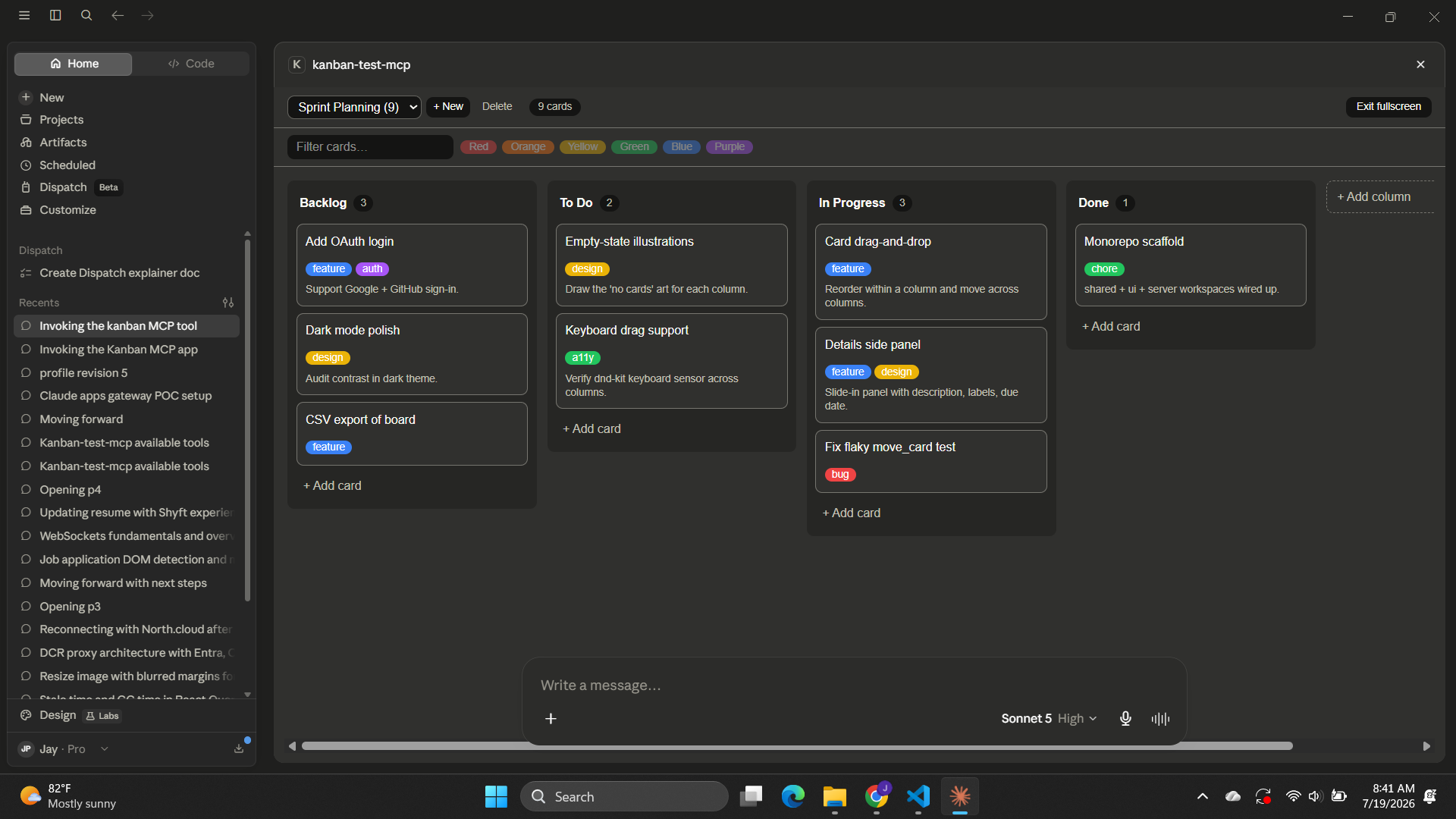
I wanted the opposite: a real interactive Kanban board rendered right inside the chat, where the LLM and I edit the same board. The model moves a card by calling a tool; I move a card by dragging it; both changes land in the same place and both sides stay in sync. The question was how a server hands a host a piece of interactive UI without shipping arbitrary code into the chat client — and then how to make that survive a real cloud deployment.
Enter MCP Apps
MCP Apps is an extension to the Model Context Protocol that lets an MCP server ship a UI resource alongside its tools. The mechanism is small and it's the whole idea:
- A tool is the API —
open_board,move_card. Same MCP tools the LLM already calls. - A resource is the view — a single self-contained HTML file served at a
ui://URI. _meta.ui.resourceUrion a tool is the link between them: "when the model calls this tool, render this UI resource alongside the result."
The host renders that HTML in a sandboxed iframe — origin-less, no cookies, no access to the host DOM, no network. The UI never talks to the server directly. When the user drags a card, the iframe asks the host to relay a tool call. The host is the only privileged channel. That sandbox is what makes it safe to let a server put UI in front of you: the worst a malicious server can do is render a bad-looking board, not exfiltrate your session.
I built a full Kanban board on this — 13 tools, drag-and-drop, multi-board, search — and took it all the way to production on AWS. This post is the mechanism, and the three bugs that only showed up once real latency and a real cloud runtime entered the picture.
The Architecture
The board runs the full journey, from a local process to a cloud endpoint fronted by a gateway:
┌───────────────────────────────────────────────────────────────┐
│ MCP HOST (Claude Desktop / claude.ai)                          │
│                                                                │
│   LLM ──calls──▶ open_board ──────────────────────────┐        │
│   sees _meta.ui.resourceUri ─▶ resources/read ui://…  │        │
│                                                       ▼        │
│   ┌──────────────── sandboxed <iframe> ────────────────────┐   │
│   │  origin-less · no cookies · no host DOM · no network   │   │
│   │  React board UI (all JS+CSS inlined in one HTML file)  │   │
│   │  drag a card ─▶ app.callServerTool("move_card") ─▶ host │   │
│   │  LLM moves a card ─▶ host pushes result ─▶ app.ontoolresult│
│   └────────────────────────────────────────────────────────┘   │
└───────────────────────────────┬───────────────────────────────┘
                                │ MCP (JSON-RPC)
                                ▼
        AgentCore Gateway  (one URL, inbound auth, tool aggregation)
                                │ M2M OAuth (Gateway → Runtime)
                                ▼
        AgentCore Runtime  (arm64 Node 22, streamable-HTTP MCP server)
                                │
        Kanban MCP server ─▶ DynamoDB (durable board state)
                          └─▶ ui://kanban/mcp-app.html  (the rendered UI)
The key idea to hold onto: the tool is the API, the resource is the view, and _meta.ui.resourceUri links them. Everything else — the gateway, the runtime, the store — is plumbing that has to carry that one relationship intact from the browser all the way to a Lambda-like microVM and back.
Wiring a Tool to Its UI
On the server, a tool that renders the board looks like an ordinary MCP tool with one extra field:
const ui = { _meta: { ui: { resourceUri: RESOURCE_URI } } };

registerAppTool(
  server,
  "open_board",
  {
    title: "Open Kanban Board",
    description:
      "Open the interactive Kanban board UI and return its current state. " +
      "This is the ONLY tool that renders the board widget — call it once to " +
      "show the board, not after every change.",
    inputSchema: openBoardInputShape,
    annotations: { readOnlyHint: true },
    ...ui,
  },
  handler,
);
And the UI itself is registered as a resource — a single HTML file with all the React, CSS, and JS inlined into it (a Vite single-file build), served at a ui:// URI:
registerAppResource(
  server,
  "Kanban Board UI",
  RESOURCE_URI,                       // ui://kanban/mcp-app-v0.7.1.html
  { description: "The interactive Kanban board UI (single-file HTML)." },
  async () => ({
    contents: [{ uri: RESOURCE_URI, mimeType: RESOURCE_MIME_TYPE, text: html }],
  }),
);
That's the entire contract. The host reads _meta.ui.resourceUri off the tool result, fetches the resource, and drops the HTML into an iframe.
The UI Talks Through the Host, Never Around It
Inside the iframe, the UI gets an app handle from the MCP Apps SDK. It never opens a socket to the server. It does two things: it calls tools through the host, and it listens for results the host pushes to it.
// User drags a card → the UI asks the HOST to run the tool:
await app.callServerTool(qualifyTool(app, "move_card"), {
  boardId, cardId, toColumnId, toIndex,
});

// The LLM moves a card → the host PUSHES the result into the open iframe:
app.ontoolresult = (result) => {
  const board = extractBoard(result);
  reconcile(board);   // replace-state; every tool returns the whole board
};
There's one design decision doing a lot of work here: every tool returns the whole board. Not a diff, not an event — the full Board JSON, every time. A board is a few KB, so the cost is negligible, and it collapses reconciliation to a single rule that serves both paths: whether the change came from the user's drag or the model's tool call, "adopt the new board" is setState(board). One rule, two sources of truth kept identical for free.
That's the happy path, and locally it worked on the first try. Then I deployed it, opened it on claude.ai, and everything interesting happened.
Bug #1: A New Board for Every Question
The first thing I noticed on claude.ai: every tool call rendered a fresh board iframe in the transcript. "Search my cards" → a new board. "Move the OAuth card" → another board. A three-message conversation ended with a stack of stale sibling boards scrolling up the page.
The cause was staring at me in the tool registrations: all 13 tools carried _meta.ui.resourceUri. I'd copy-pasted the UI field onto every tool thinking of it as "this tool is part of the board app." But that field doesn't mean "this tool belongs to the UI" — it means "render the UI when this tool is called." Widgets in MCP Apps are anchored to tool calls in the transcript; that's the protocol's model, not a host quirk (OpenAI's Apps SDK behaves the same way). Attach UI metadata to every tool and you've literally asked the host to render a widget per call. It did exactly what I asked.
The fix was to attach _meta.ui to only open_board — the one tool whose purpose is showing the board — and make the other 12 data-only:
const ui   = { _meta: { ui: { resourceUri: RESOURCE_URI } } };  // renders the widget
const noUi = { _meta: {} };                                     // data-only

registerAppTool(server, "open_board",  { ...opts, ...ui   }, openHandler);   // shows it
registerAppTool(server, "move_card",   { ...opts, ...noUi }, moveHandler);   // silent
registerAppTool(server, "create_card", { ...opts, ...noUi }, createHandler); // silent
A mutation's result still reaches the already-open widget — through the host's ontoolresult push, not a new iframe. And because a model that wants to "show its work" will instinctively call open_board after every edit and bring the widget-soup right back, the mutation tool descriptions actively steer it away:
"Returns the updated board as data; it does not render a new UI — the already-open board widget reflects the change."
The transferable lesson: UI metadata on a tool is a render instruction, not a link. Attach it only to tools whose job is to show the UI.
Bug #2: Drag-and-Drop That Only Worked at Zero Latency
Locally, drag-and-drop was flawless. Through the gateway, it felt broken: cards snapped back to their source column, appeared to swap with each other, or landed in the wrong slot.
That difference is the diagnosis. Locally the server round trip is ~0ms, so every response reconciled before I could do anything else. Through claude.ai → Gateway → Runtime, a round trip takes seconds — long enough to start two more drags before the first response returns. Four separate defects had been hiding behind the zero-latency curtain. The two that best show the shape of the problem:
Out-of-order reconciles stomped newer state. The UI adopted every server response as it arrived. Drag card A, then card B: response A returns after B's optimistic update and replaces the whole board with a snapshot that predates B — so B visibly snaps back. The fix is a mutation pipeline with sequencing discipline. The optimistic apply stays immediate (latency must never reach the pointer), but tool calls are chained onto a promise queue so they reach the server in the order I acted, and an in-flight counter means a server response is adopted only when it's the last one out:
pendingCountRef.current++;               // queued a mutation
queueRef.current = queueRef.current
  .then(() => app.callServerTool(name, args))
  .then((board) => {
    pendingCountRef.current--;
    if (pendingCountRef.current === 0) {
      reconcile(board);                  // last one out wins; intermediates dropped
    }
  });
Intermediate reconciles are simply dropped — the final response reflects them all anyway, because every tool returns the whole board. That "whole board every time" decision from the happy path quietly pays for itself again here.
Drop indices were computed on the filtered board. The board view renders a filtered projection of the real board, and its drop handler computed the target index from filtered positions — but the server applies indices to the full board. Any active filter meant a wrong landing slot. The fix was to stop computing indices in the view at all: report the drop anchor (the card you dropped onto) and let the mutation layer translate the anchor to an index against the full, current board at drop time.
The lesson generalizes past Kanban: report anchors, not indices, from drag handlers whenever the rendered collection is a projection (filtered or sorted) of the real one. And more broadly — any optimistic UI that adopts server echoes needs an in-flight counter and a last-response-wins rule the moment round-trip time exceeds how fast a human can act.
Bug #3: The Store That Reset on Every Call
This is the one I'm fondest of, because the model diagnosed it before I did.
Testing on claude.ai, the board kept "resetting." Add a column → the tool result shows it. Open the board a moment later → the column is gone. A seeded card kept reappearing at its exact starting position no matter how many times I moved it. Unprompted, the model wrote:
"the test server either resets state on each
open_boardcall or doesn't reliably persist changes."
It was right. The deployed server persisted boards to SQLite at /tmp/kanban.db — inside the AgentCore Runtime microVM. And that's the whole bug. AgentCore Runtime isolates and recycles microVMs per session, and the Gateway in front of the runtime holds no long-lived session across the model's tool calls. So successive tool calls landed on fresh microVMs, each with its own empty /tmp. An empty database triggered the server's seed-on-empty path, which dutifully created a pristine demo board and served that. Every call effectively started from the seed. The column I added lived only in the microVM that added it, gone by the next call. The card "reappeared" because it was being re-seeded, not restored.
(If that session-per-microVM recycling sounds familiar, it's the exact behavior I dug into in How Bedrock AgentCore Runtime Works Under the Hood — the microVM's disk is a scratchpad, not a database, and it's sanitized when the session ends. I'd written the explanation and then walked straight into the bug it predicts.)
There is no fixing this on the filesystem. Durable board state has to live outside the microVM, in a managed store. On AWS that's DynamoDB. Two design choices made the swap clean:
Blob-per-board, not a relational port. A board is a small aggregate that's always read and written as a whole. So instead of modeling boards/columns/cards as separate items with GSIs and multi-item transactions, each board is one item — its full JSON under a single key. One GetItem loads it; one PutItem saves it. The JSON arrays are the ordering; there's nothing to join.
Optimistic versioning instead of transactions. Every board item carries a version. Every mutation is: load → apply a pure Board → Board transform → conditional write that only succeeds if the version still matches.
load board  →  apply pure Board→Board transform  →  PutItem
                                                     ConditionExpression:
                                                       version = :expected
If another session bumped the version in between, DynamoDB rejects the write with ConditionalCheckFailedException, and the driver retries: reload the newer board, re-apply the transform, write again. Two sessions racing can't silently clobber each other — the conflict is resolved by re-computation on fresh state, not last-writer-wins. It's cheaper than a DynamoDB transaction and exactly enough for a single-item write.
The reason this was a small change rather than a rewrite: persistence had been behind a store.ts boundary since early on, "just in case." Swapping the entire backend meant writing one new driver and a facade that picks it from an env var:
KANBAN_TABLE set   → store-dynamo.ts   (durable DynamoDB — cloud)
KANBAN_TABLE unset → store-sqlite.ts   (local single-file SQLite — dev)
The tool layer, the UI, and even the error strings never learned it happened. Then the money shot, verified live: add_column → open_board sees it → wait two minutes idle (past microVM recycling) → open_board still sees it. With the old /tmp SQLite, that column vanished on the second call.
Two More Things the Cloud Taught Me
Gateways rename your tools, and the widget has to notice. An AgentCore Gateway re-exposes every tool as <targetName>___<toolName>. The LLM picks names from the gateway's tools/list, so its calls route fine — but my widget had move_card hardcoded in callServerTool, a name that doesn't exist at the gateway, so every drag threw -32602 Unknown tool: move_card. The widget must call whatever name the connected endpoint exposes, which it discovers from the tool call that instantiated it: hostContext.toolInfo.tool.name is kanban-runtime-target___open_board behind the gateway, and everything up to the last ___ is the prefix to prepend.
Hosts cache UI resources by URI, with no etag to revalidate against. After I deployed a UI fix, claude.ai kept rendering the old cached widget for the unchanged URI while tool calls (always live) used the new server. Classic web cache-busting applies: bake the version into the URI (ui://kanban/mcp-app-v0.7.1.html) so every release is a resource the host has never seen, keeping the old URIs registered as aliases for anything holding stale metadata.
And there's a whole other iceberg I've skipped here: how the host gets a token to call any of this through the Gateway in the first place. Authenticating an MCP client you didn't write — Claude, VS Code, Kiro — to a remote server behind Cognito turned out to be involved enough that I gave it its own post: why DCR fails on Cognito, and the static client-ID path that works.
What I Learned
The _meta.ui field is the whole protocol, and it's a verb
"Render this UI when this tool is called" — not "this tool is part of this app." Getting that one distinction wrong is what produced a fresh board per question. One tool shows the UI; everything else is data.
One reconcile rule beats a diffing protocol
"Every tool returns the whole board" felt wasteful until it wasn't. It made user-drags and LLM-tool-calls reconcile through the same code path, and it's what let me drop intermediate responses during rapid drags without losing any state.
Optimistic UI is a latency-zero illusion until proven otherwise
Zero-latency local testing hides every ordering bug an optimistic client has. The moment round-trip time exceeds human action rate, you need sequencing: a promise queue, an in-flight counter, and a last-response-wins rule. Test against real latency, or you're testing a different program.
Ephemeral compute needs external state from day one
Any per-session sandbox that recycles between calls — serverless, microVMs, edge — cannot hold durable state on its local disk, no matter how durable that disk looks within one request. Put state in a managed store, or behind a boundary you can swap to one. The store.ts boundary was the cheapest insurance I've ever bought: it turned "rewrite the persistence layer" into "write one driver."
Model the store to the access pattern, not the ER diagram
A board is always read and written whole, so it's one DynamoDB item, not five with GSIs. The relational port would have added transactions to solve a problem I didn't have.
Try It Out
The full source is on GitHub: jay-1799/mcp-apps-agentcore
It's a two-app monorepo (a Kanban board and a Data Explorer) built as a phased portfolio project — from a local stdio server, to dual-transport streamable-HTTP, to a live AgentCore Runtime deployment behind a Gateway, then hardened for real use on claude.ai. Each phase is written up in kanban/docs/ as its own build journal, including the three bugs above.
To run the Kanban board locally: npm install, npm run build, then npm start for the stdio server, and point any MCP Apps host (the reference basic-host, or Claude Desktop) at it. No AWS account needed — the local path uses single-file SQLite, and the whole board renders in the host's iframe with drag-and-drop working. The AgentCore deploy is scripted end-to-end for when you want to watch it survive a microVM recycle.